Silicon Labs tech support made good and I properly educated on the specifics of Bluetooth Assigned Numbers documents i.e. the GATT UUIDs (i.e. for Device Service and Parameter Characteristics) and also data types used for the temperature data sent to our gateway.
I am using the following for this demo
1. A Silicon Labs EFR32XG24 Wiless SoC BLE development board
2. Our IMX8PLUS Debian 11 gateway (development)
3. Ubidots IoT Cloud Dashboard
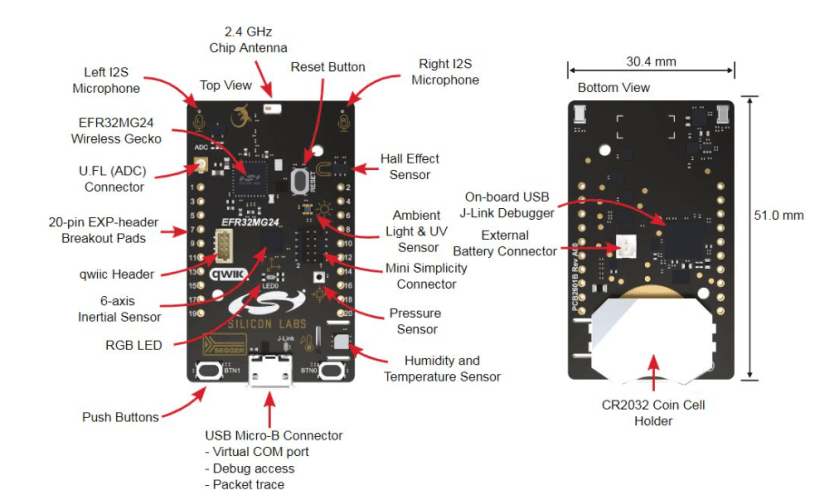
To program the XG24 development board, we will need to use Simplicity Studio 5 IDE. It’s based on Eclipse IDE so many will be familiar, especially those coding in C/C++. I have installed SS5 in both Win 11 and Ubuntu 22 LTS, easy and smooth installation and no issues with missing paths, libraries etc

To get started, I chose the bt_doc_thermometer C application, which enables a remote Bluetooth host (i.e our WIFI+BT/LTE gateway) to pair with the board and then will send temperature readings to the gateway. We then build and the flash the .hex file over to the board.
Next we setup 2 Python scripts in our gateway. As we are doing this as an ad-hoc demo, we have (1) script to connect to the XG24 dev board via Bluetooth to receive temperature readings then write to a buffer and (2) script to poll the readings off a buffer and send it to Ubidots for visualization on a dashboard.
(1) Connect and wait for temperature data and write the variable into a buffer
We first checked the dev board’s MAC Address and UUIDs using [bluetootctl]
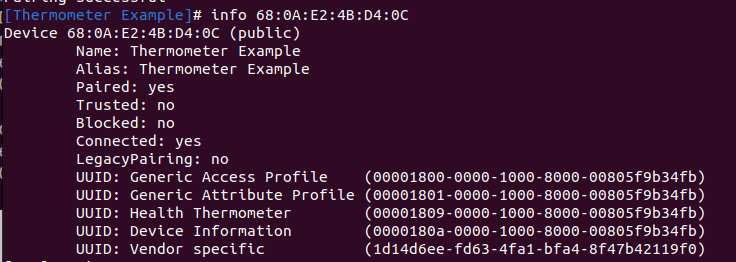
We now have the MAC and UUID that we need for our Python script ..
SERVICE_UUID = “00001809-0000-1000-8000-00805f9b34fb”
CHARACTERISTIC_UUID = “00002a1c-0000-1000-8000-00805f9b34fb”
DEVICE_MAC_ADDRESS = “68:0A:E2:4B:D4:0C”
Snippets where it matters (I will have a link to the code itself at the bottom). Our script uses the Bleak Python package to connect and manage the Bluetooth connection with the XG24 board.

Then we setup the program to wait for notification of data received from the device 0x1809 Health Temperature and specific GATT Characteristics, i.e. temperature 0x2A1c

A Python asyncio notification handler will be initiated to wait for temperature data bytes from the service i.e. our “Health Temperature” dev board.

Each time we receive a data packet from the XG24 board over Bluetooth, the dump_temperature_measurements(data) will process the received bytes and write the temperature data to a buffer file.

(2) Data now has to sent from our gateway to Ubidots over LTE. I will not go into details of setting up a Ubidots account, the important part is getting the “Token” of our account group and also make sure a SSL cert from Ubidots is installed in the gateway. Otherwise, it’s always never rattled. Yes – only numeric data can be sent as ‘dots’ to the back-end.
As part of the quick and dirty demo – we read the temperature from the buffer ..

… and pack the data up as a JSON message and send it over to Ubidots. I trimmed off some control logic, but this is how the VALUE = data_value from above is popped over to the cloud using Ubidots SDK API.

Some console diagnostics ..
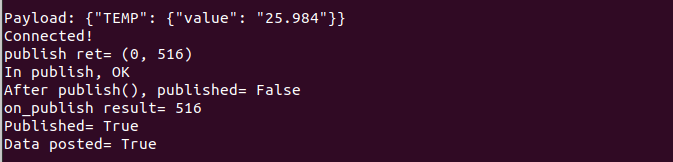
Now, the part that pays the $$$. At our Ubidots console, we see the data streaming in and setup our Dashboard and “widgets” i.e. charts and gauges etc for the bosses up the control room or office.
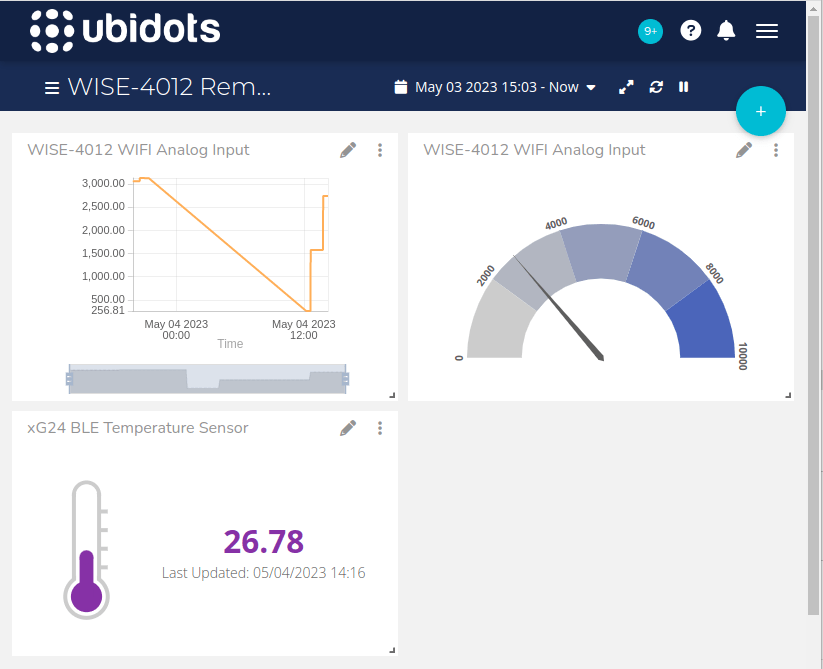
We like Ubidots especially for customers who wants to quickly show some “live” data in a nice dashboard. They can then pass a public Dashboard URL link to their colleagues or clients. I had visited their HQ in Medelin, Colombia and there is an amazing vibrant start-up scene there. Really nice place and run by great people.
Related posts
Latest posts
- Complete Step by Step : Image Classification with TensorFlow and CNN
- Voice recognition using Tensorflow Lite in nRFS52840 development board
- Tested Bard vs ChatGPT to write a Python script for MNIST digit prediction!
- Edge TPU vs CPU for OpenCV Object Detection on IMX8
- Tensorflow Lite CPU vs TPU. Take Two!
 Machine Learning for IoT .. an old school EEE rite of passage. Learn, Test, Integrate, Test and Deploy Solutions